
A PHP Error was encountered

Severity: 8192

Message: strtolower(): Passing null to parameter #1 ($string) of type string is deprecated

Filename: MX/Loader.php

Line Number: 160

Backtrace:

File: /home/emoabhlp/public_html/cerdig.com/manualbook/application/third_party/MX/Loader.php
Line: 160
Function: strtolower

File: /home/emoabhlp/public_html/cerdig.com/manualbook/application/third_party/MX/Loader.php
Line: 192
Function: library

File: /home/emoabhlp/public_html/cerdig.com/manualbook/application/third_party/MX/Loader.php
Line: 153
Function: libraries

File: /home/emoabhlp/public_html/cerdig.com/manualbook/application/third_party/MX/Loader.php
Line: 65
Function: initialize

File: /home/emoabhlp/public_html/cerdig.com/manualbook/index.php
Line: 315
Function: require_once

A PHP Error was encountered

Severity: 8192

Message: strtolower(): Passing null to parameter #1 ($string) of type string is deprecated

Filename: MX/Loader.php

Line Number: 160

Backtrace:

File: /home/emoabhlp/public_html/cerdig.com/manualbook/application/third_party/MX/Loader.php
Line: 160
Function: strtolower

File: /home/emoabhlp/public_html/cerdig.com/manualbook/application/third_party/MX/Loader.php
Line: 192
Function: library

File: /home/emoabhlp/public_html/cerdig.com/manualbook/application/third_party/MX/Loader.php
Line: 153
Function: libraries

File: /home/emoabhlp/public_html/cerdig.com/manualbook/application/third_party/MX/Loader.php
Line: 65
Function: initialize

File: /home/emoabhlp/public_html/cerdig.com/manualbook/index.php
Line: 315
Function: require_once

A PHP Error was encountered

Severity: 8192

Message: strtolower(): Passing null to parameter #1 ($string) of type string is deprecated

Filename: MX/Loader.php

Line Number: 160

Backtrace:

File: /home/emoabhlp/public_html/cerdig.com/manualbook/application/third_party/MX/Loader.php
Line: 160
Function: strtolower

File: /home/emoabhlp/public_html/cerdig.com/manualbook/application/third_party/MX/Loader.php
Line: 192
Function: library

File: /home/emoabhlp/public_html/cerdig.com/manualbook/application/third_party/MX/Loader.php
Line: 153
Function: libraries

File: /home/emoabhlp/public_html/cerdig.com/manualbook/application/third_party/MX/Loader.php
Line: 65
Function: initialize

File: /home/emoabhlp/public_html/cerdig.com/manualbook/index.php
Line: 315
Function: require_once

Yayasan - Tabungan

Yayasan - Tabungan

Didalam menu Iuran Siswa - Tabungan terdapat fitur Transaksi yang menampilkan Daftar Tabungan Siswa, jadi Yayasan dapat memantau daftar tabungan siswa di sekolah.

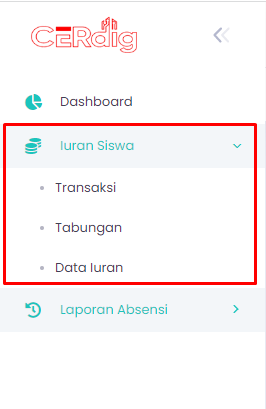
step 1 - cara mengakses menu Tabungan

Untuk mengakses menu Iuran Siswa - Tabungan Yayasan bisa mengklik Iuran Siswa di navigasi bar sebelah kiri, kemudian pilih Tabungan

Last updated 01 May 2026
...
step 2 - tampilan menu Tabungan

Maka selanjutnya akan tampil data tabungan siswa. "dapat dilihat pada gambar dibawah".

Last updated May 2026
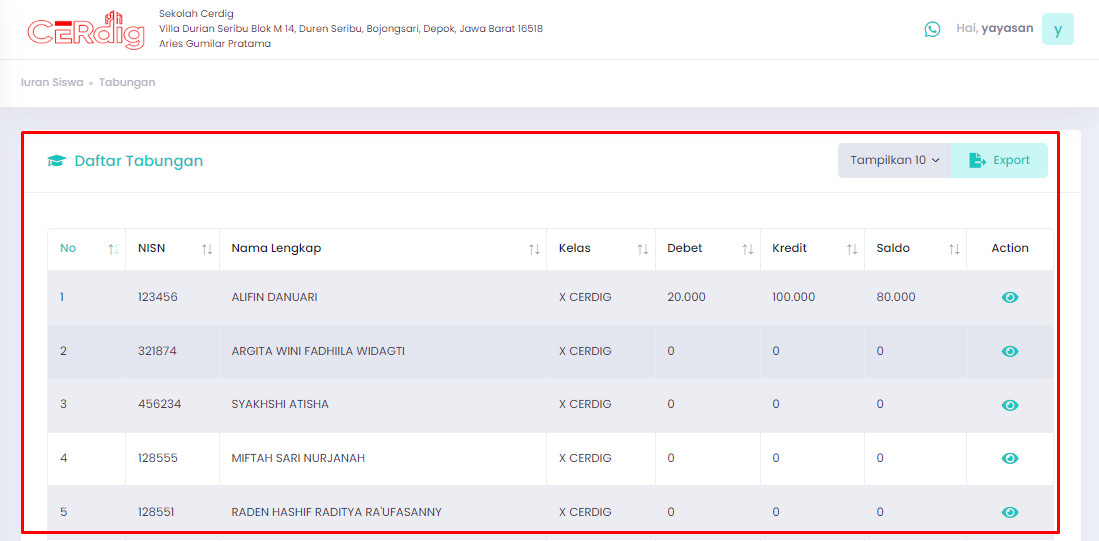
gambar tampilan daftar tabungan siswa

Semua terdata secara lengkap dan otomatis dengan Cerdig.